Free llms.txt generator
Build a valid llms.txt file in the browser — name your site, add the pages you most want AI systems to read, and download the file. Nothing is uploaded; the whole thing runs on this page.
What an llms.txt file is
An llms.txt file is a short markdown file you place at the root of your domain — /llms.txt — that hands AI systems a curated map of your site: your name, a one-line summary, and links to the pages you most want a model to read. It is a proposed convention, not a search-engine mandate. The idea mirrors what robots.txt did for crawlers: give automated readers a predictable place to look, and tell them what matters. This llms.txt generator writes that file for you so you do not have to memorise the format.
Why generate an llms.txt file
Large-language-model readers do best with clean, curated signal. A homepage buried in navigation, banners and scripts is expensive to parse; a tidy llms.txt file says, in plain markdown, “here is who we are and here are the pages that explain us.” Generating one is close to free and gives you editorial control over the shortlist an AI sees first. The honest caveat: the file is an input, not a guarantee. It makes your best pages easy to find and summarise — whether a model then recommends you depends on what it already knows and which sources it trusts.
llms.txt vs robots.txt vs sitemap
Three files, three jobs. It helps to see them side by side before you generate one.
| File | Question it answers | Audience |
|---|---|---|
| robots.txt | What may you fetch? | Crawlers |
| sitemap.xml | Every URL, for indexing | Search engines |
| llms.txt | Which few pages matter most? | AI readers |
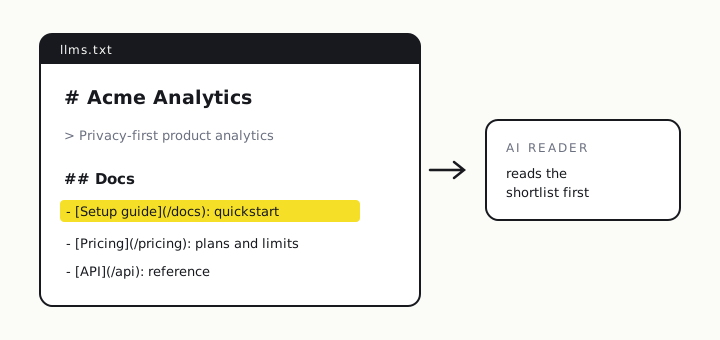
The format itself is documented at the llms.txt specification site. The generator above follows it: an H1 for the name, a blockquote for the summary, optional prose, then a Docs section of markdown links.
How to use the file you just generated
Download the file, keep the name llms.txt, and upload it to the root of your site so it resolves at https://yoursite.com/llms.txt — the same place robots.txt lives. There is no submission step; systems that support the convention look for it there. Re-generate and re-upload whenever your key pages change. If you maintain a long-form variant, the convention also allows an llms-full.txt with the expanded content.
The step an llms.txt generator can’t do for you
Writing the file is the easy half. The half that decides revenue is whether the models actually name you when a buyer asks — and an llms.txt file, on its own, won’t tell you that. That is a measurement question: across the questions your buyers ask GPT-5.6, Grok and Claude, how often are you mentioned, where do you rank, and who wins the prompts you lose? Generate the file, upload it, then take a baseline so you can see whether it — or your next content push — moved anything.
See whether AI actually recommends you
An llms.txt file makes you easy to read; a visibility check tells you if the models name you at all. Mention rate, average rank and share of voice across GPT-5.6, Grok and Claude — free during launch, no sign-up.
llms.txt generator FAQ
What is an llms.txt file?
A single markdown file at the root of your site — /llms.txt — that gives AI systems a curated map of what matters: your name, a one-line summary, and the handful of pages you most want models to read. It is a proposed standard, not a Google requirement, aimed at the same problem robots.txt solved for crawlers: telling automated readers where to look.
Does an llms.txt file improve my AI visibility?
It is a plausible, low-cost input, not a guarantee. The file makes your key pages easy for an AI to find and summarise, but being recommended still depends on what the models already know about you and which sources they cite. Generate the file because it is cheap and sensible; then measure whether models actually name you rather than assuming the file moved the needle.
Where do I put the file this generator makes?
Save it as llms.txt and upload it to the root of your domain so it resolves at https://yoursite.com/llms.txt — the same place robots.txt lives. Some teams also add an llms-full.txt with the expanded content. No submission step is required; systems that support the convention look for it there.
Is llms.txt the same as robots.txt or a sitemap?
Different jobs. robots.txt tells crawlers what they may fetch; an XML sitemap lists every URL for indexing; llms.txt curates a short, human-readable shortlist of your best pages for an AI to read and paraphrase. The first two are about coverage and permission; llms.txt is about editorial emphasis — what you want the model to notice first.
Related: the LLM SEO tool · GEO tools in 2026 · the 10 best AI visibility tools.